Corksy Reporting
Last updated: October 6, 2026
On this page
Glossary of Headers Across All Reports
Exports of Sales by Order and Sales by Order by SKU also include a Report Definitions tab that explains every column in that report.
Header | Description |
ORDER DATE | The date an order is created (whether or not the order fails payment). |
EDITED DATE | For an edited or refunded order, the date the change was captured or the return was made, rather than the original order date. |
ORDER NUMBER | Unique identifier for each order placed. |
ORDER TYPE | The channel from which the order was placed: E-commerce, Wine Club, Manual Order, POS. |
TOTAL PRICE | The price of an order after any Tax, Discounts, Shipping/Handling, and Tips have been applied. |
SUBTOTAL | The price of an order before any Tax, Discounts, Shipping/Handling, and Tips have been applied. |
REVENUE COLLECTED | Final amount collected (Subtotal + Tax + Shipping + Handling + Tips - Discounts). |
NET REVENUE COLLECTED | Final net amount collected (Subtotal - Discounts). |
SALES TAX | The amount of sales tax collected on an order excluding CRV. |
CRV | The amount of CRV tax collected on an order. |
TOTAL TAX | Sales Tax + CRV Tax. |
DISCOUNTS | In Sales by Order and Sales by Order by SKU, one total that combines discounts from all sources applied to the order (or, in the SKU report, to the line). |
TOTAL DISCOUNTS | In reports that show wine club discounts separately: any discount(s) applied that are NOT part of a wine club discount. |
WINE CLUB DISCOUNTS | In reports that show it separately: any discount(s) applied for being part of a wine club (e.g., automatic club discount). |
SHIPPING PRICE | The cost of shipping for a particular order based on automatic or manual rates in Corksy. |
HANDLING FEE | Additional fee set by the winery to account for handling expenses (not customer-facing). |
TOTAL LITERS | The total number of liters of wine in a particular order (used for monthly state reporting). |
TIPS | Any gratuity added by the customer. |
FULFILLMENT STATUS | The status of an order: Fulfilled (Shipped or Picked up) or Unfulfilled (NOT Shipped or Picked up). |
PAYMENT TYPE | How the order was paid: CARD (credit card), SCANNER (payment terminal), CASH (cash). |
CLUB NAME | The wine club name entered at club creation (e.g., Gold/Silver/Bronze Club). |
PRODUCT TYPE | Product category: Wine, Food, Merchandise, Other, Bundle. |
PRODUCT NAME | The name given to a product by the winery (e.g., Corksy Cabernet Sauvignon). |
VARIANT NAME | Used for differentiating the same product by size/color/weight (e.g., 750ml, Large, Red). |
SKU | Stock Keeping Unit: Winery-assigned identifier for each product (e.g., 09CKCH). |
DISCOUNT NAME | The name assigned to a discount (e.g., 2024 Holiday Discount). |
DISCOUNT CODE | The code entered to receive a discount (e.g., SAVE15). |
BOOKING DATE | The date of booking or reservation. |
EVENT NAME | The name given to the event as a unique identifier. |
EVENT PRICE | The cost of the booking or reservation. |
NUMBER OF SALES | Total number of times the event has been purchased. |
CUSTOMER TYPE | Breakdown of 3 customer types: |
STATE/STATE CODE | Two-letter state code following standard USPS codes. |
Filtering Reports (Before Exporting)
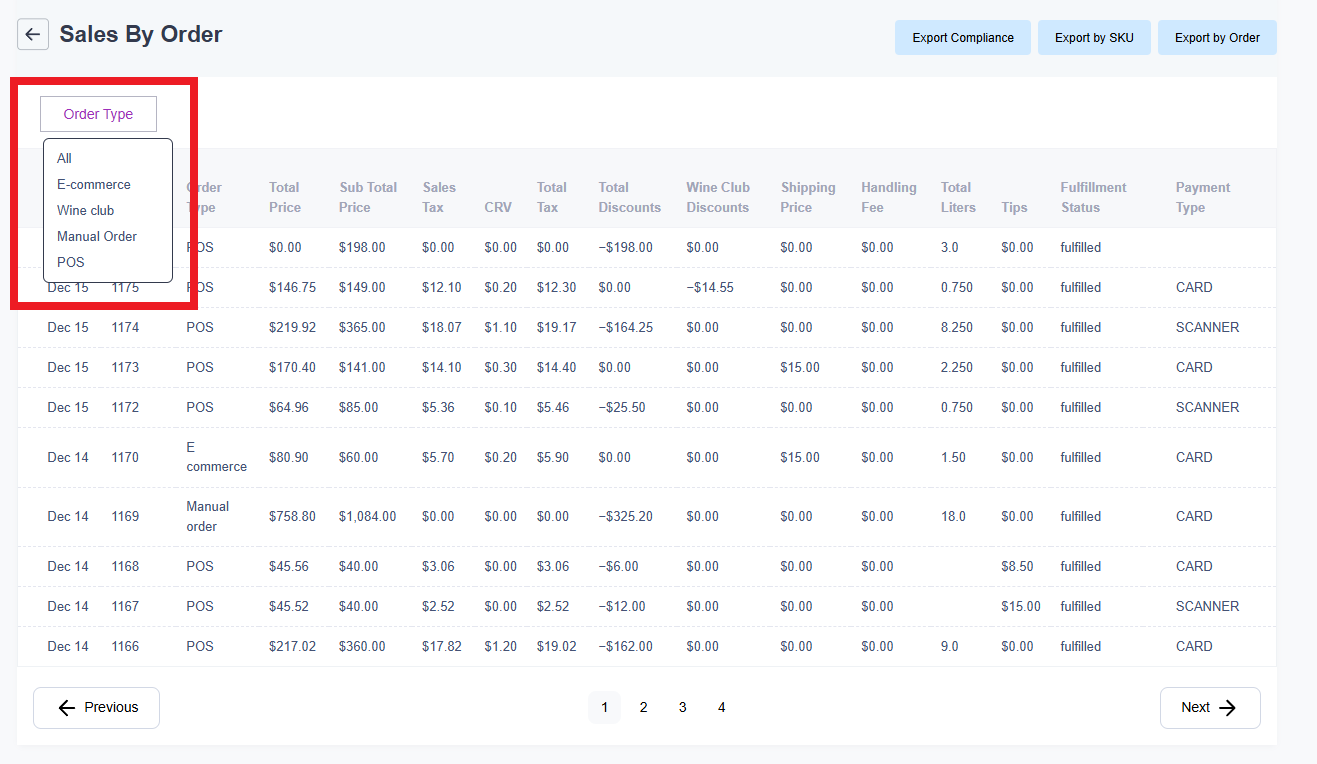
In the "Sales by Order" report, you can filter by "ORDER TYPE" (E-commerce, Wine Club, Manual Order, POS). Click the button highlighted below to get a live view of the order type, or filter first and then export for more detailed results:
Exporting Reports
Every report in Corksy is exportable by hitting the "Export" button in the top right corner when you open a report. Exporting reports is an essential feature for effectively analyzing and utilizing your data. By exporting reports in an XLSX format, you can seamlessly open them in tools like Excel or Google Sheets. These programs provide powerful options for sorting, filtering, and manipulating your data to uncover valuable insights. Whether you’re using reporting to refine your marketing strategies, set competitive discounts, or manage your accounting records, having the flexibility to work with your data in these tools ensures you can draw actionable conclusions and make data-driven decisions with confidence.
In exported files, the header row stays visible as you scroll. Sales by Order exports also include a Report Definitions tab that explains each column.